My AI-Powered Engineering Workflow
How I built a cost-effective AI workflow that keeps routine tasks cheap while reserving powerful models for work that requires deeper reasoning.
Introduction
I wanted AI to support my daily engineering work without becoming another expensive subscription. I already use ChatGPT Plus for planning, brainstorming, research, and general tasks, so I built this workflow around the subscription I already had.
I also needed a tool that would let me choose among providers and configure a hierarchy of agents instead of asking one expensive model to do everything. After testing several options, I settled on OpenCode. By routing each task to an appropriate model and reducing unnecessary context, I stay within the minimal usage limits.
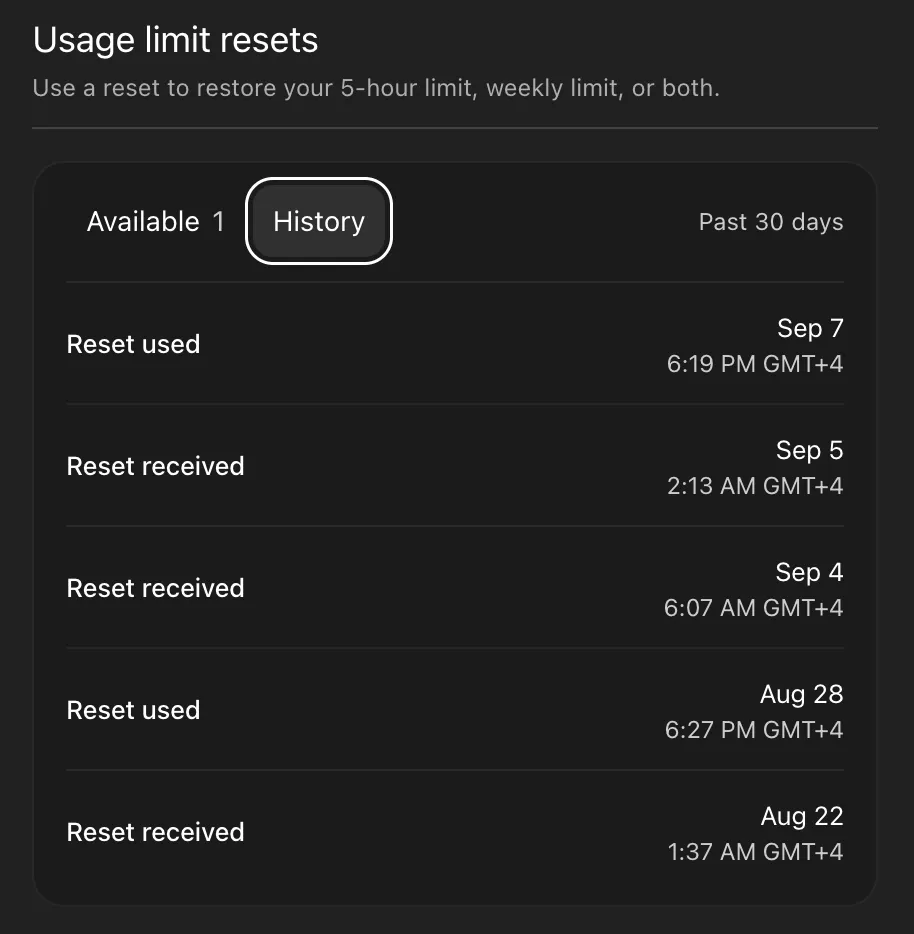
I started using the setup described here on September 7, 2026. This screenshot shows my usage-limit reset history from that period.
The main idea is simple:
Do not spend expensive reasoning on cheap work.
The biggest gains come from deciding which model and tool should handle each part of a task. I reserve the strongest models for work that benefits from deeper reasoning. Repository searches, file reads, and routine commands usually do not need them.
I have shared a minimized copy of my OpenCode configuration so you can follow the setup while reading.
Workflow
OpenCode is the central tool in my workflow. It lets me work with multiple hosted and local providers from one place. It also manages agents, tools, permissions, Model Context Protocol (MCP) servers, and skills, so I can divide the workflow into clear roles.
In my setup, it connects to my ChatGPT Plus subscription (not the OpenAI API) for top-level reasoning models, NVIDIA and Ollama Cloud for free or inexpensive models, and an on-premises Ollama instance for local models.
Because OpenCode sits between me and the providers, I can replace a model or provider without rebuilding the rest of the workflow.
Agents Hierarchy
Most development tasks that involve agents do not require deep reasoning. Much of the work involves:
- searching a repository
- reading files
- collecting logs
- running commands
- making simple edits
- checking test results
My lead agent delegates these tasks to cheaper or free workers. It escalates only when a task requires deeper analysis, a difficult trade-off, or an independent review.
🟢 Free · 🟡 Cheap · 🔴 Expensive
Control
Cost control is not enough. An agent that can run commands or reach infrastructure needs clear boundaries and limited permissions.
I use three layers of control:
- Delegation depth: I limit how far one agent can delegate to another. This prevents unnecessary loops and makes usage easier to understand.
- Permissions: I deny access by default, then explicitly allow commands, tools, and skills for each agent.
- Watcher ignore rules: I exclude dependency directories, generated files, build output, and other noisy paths that the agent does not need to monitor.
Compaction
Model choice is only one part of efficiency. Context is another.
Long-running coding sessions accumulate:
- previous reasoning
- tool output
- diffs
- test logs
- command results
- obsolete intermediate information
Keeping all of that in active context is wasteful. I use OpenCode’s automatic compaction and pruning to compress older information and remove obsolete tool output as the context grows. This reduces the amount of old context processed on later turns and keeps the model focused on information that still matters.
Noise Reduction
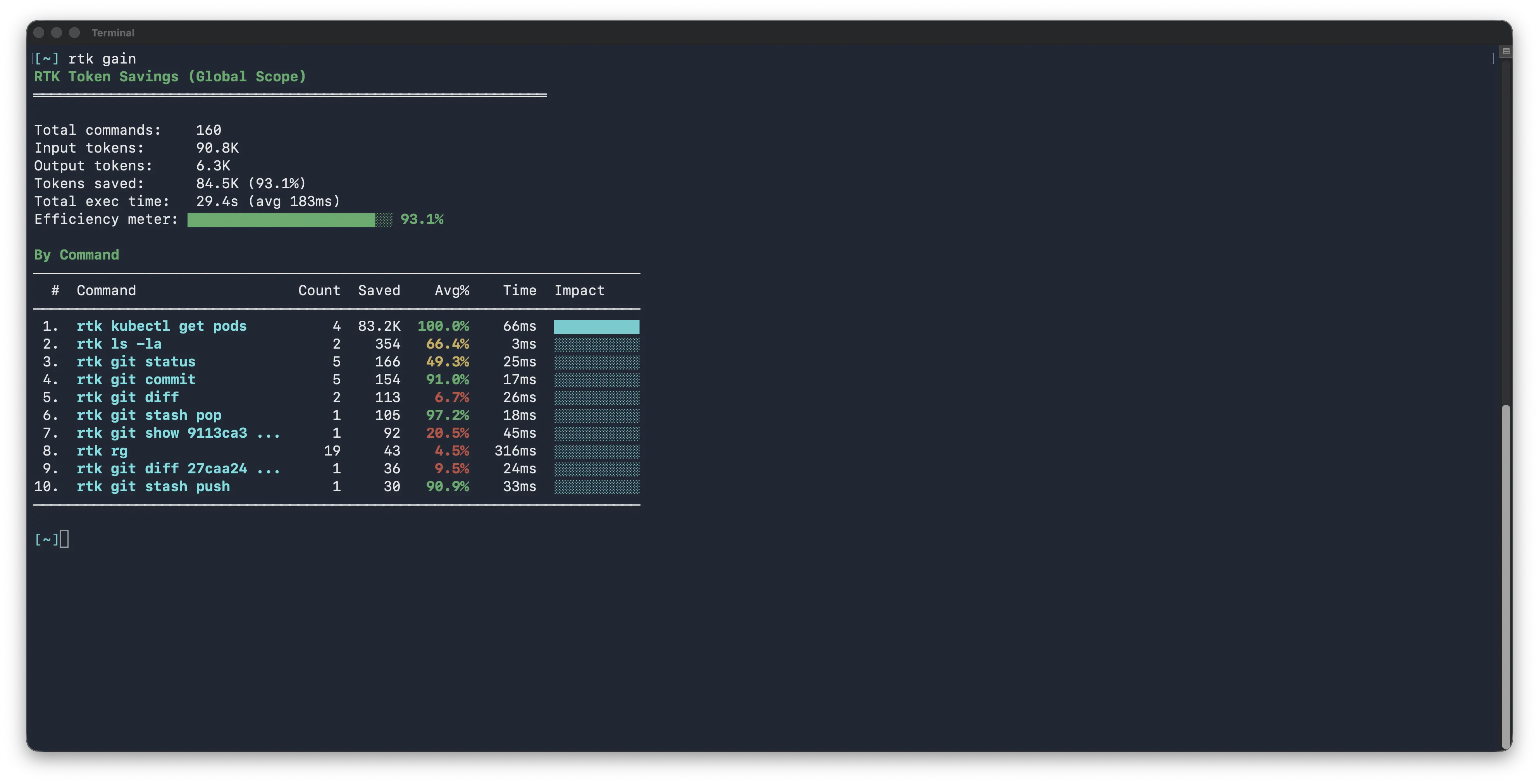
Shell commands can produce enormous outputs with little useful information. git diff, kubectl, Docker, test suites, and build tools can dump hundreds or thousands of lines into the model’s context.
I use RTK to reduce that output before it reaches the agent. This complements compaction: compaction cleans up the accumulated conversation, while RTK prevents unnecessary data from entering it in the first place.
Memory
Another source of unnecessary cost is repeatedly teaching the agent about the same project. Without memory, new sessions tend to rediscover questions such as:
🤖 How is this repository structured?
🤖 How do I run the project?
🤖 Why was this decision made?
🤖 What did we already try?
I use opencode-mem. It stores project memories locally and retrieves only the relevant parts when needed. This reduces token usage because the model receives a small amount of relevant, pre-existing context instead of repeatedly reconstructing that context from the codebase.
Tools and Skills
Model Context Protocol (MCP) servers give the agent controlled access to external systems and their data. Skills provide task-specific instructions and workflows.
As a DevOps engineer, my initial set of MCP servers covers:
- Kubernetes — cluster and workload inspection
- Grafana — metrics, logs, and observability context
- Jira — requirements and task context
- GitLab — repositories, merge requests, pipelines, and continuous integration
- Chrome DevTools — browser-side testing and debugging
I avoid loading many global skills and MCP servers because they add irrelevant context to every agent. Instead, I enable role-specific skills and MCP servers only when an agent needs them.
Conclusion
At the time of writing, my only recurring AI subscription cost is ChatGPT Plus at $20 per month. I keep costs low by separating implementation from reasoning. Cheaper or free models handle routine execution, while stronger models focus on analysis and decisions.
My setup will continue to evolve as models, limits, and tools change. The goal is not simply to reduce costs, but to continuously explore and adapt to the rapidly improving capabilities of AI.